

Parallel Printer Cable to Buy – Quality Adapters & Connections at an Affordable Price
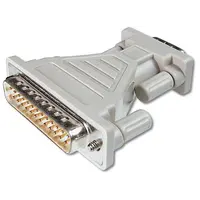
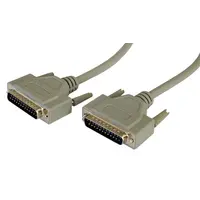
Look, it’s 2026. Everything is cloud, AI, all that nonsense. And here you are, looking to buy a Parallel printer cable. Why? Because you’ve got some old dot matrix printer in the office that just refuses to die, or a critical cash register for your business, or a CNC machine. This equipment doesn’t care what new Windows version just came out. It needs to connect to an old printer. Period. Buying a Parallel printer cable might sound simple. You go to Google, search for “Parallel printer cable online,” and you’re done. But then… then the problems start. Your new computer (which, of course, only has USB) suddenly doesn’t recognize the printer. That’s why when people ask me where to buy a Parallel printer cable in Israel, I always say – only from a place that understands what you’re looking for. And no, a cheap printer cable from some Chinese website is not the solution here. It’ll fall apart in your hand, or the signal will drop. You need a recommended printer cable with a genuine conversion chip inside. An LPT cable that works. There’s a lot of talk online these days, people comparing printer cable prices and then discovering there’s no stock available. Here at Top-Market? We’ve got it. Fast shipping to all over the country – because I know that when the office printer dies, it needs to be back up and running yesterday. Oh, and also an official importer’s warranty. ### Wait, What Kind of Connector Do You Actually Have There? This is where everyone messes up. Everyone. Before you ask how much a Parallel printer cable costs, check what you have on the back of your printer: - **DB25 Connector:** Looks like that antique connector (25 pins) that printers had twenty years ago. - **Centronics Connector:** A 36-pin printer cable. The big one with the metal latches on the sides. Looks like a tank. If you need to connect this to a modern computer, you’re essentially buying a USB to Parallel adapter (IEEE 1284 standard, to be nerdy for a moment). It’s plug-and-play. Connect it to the USB on the computer – connect it to the printer – it works. This kind of cable usually comes in standard lengths, say a 1.5-meter printer cable or a 3-meter cable (that’s already a bit borderline for the signal, but it works). You can easily find a special price for a Parallel printer cable online here, including the option for installment payments (up to 12 payments – yes, secure purchase and all that, even for computer peripherals). If you’re searching for a Parallel printer cable shop Israel internet (who even searches like that?) – you’ve come to the right place. This is the best Parallel printer cable to buy now. Especially from normal brands like Gold Touch that provide a quality cable, an original cable with a good chip that doesn’t require printer driver installation. Just a regular data cable – an adapter without drivers. ### A Few Dry Facts for Those Who Dislike Long Texts:| Cable Type / Specification | Length | Connector Side A (to Computer) | Connector Side B (to Printer) | Operating System Compatibility |
|---|---|---|---|---|
| USB to Centronics 36-pin Adapter | 1.5m / 3m | USB Type A | Centronics (36 pins with latches) | Windows 10/11, Mac, Linux (Plug & Play) |
| USB to DB25 Adapter | 1.5m | USB Type A | DB25 (twenty-five pins – male/female connector as applicable) | Windows 10/11, also suitable for cash registers |
| Direct LPT Cable (Parallel to Parallel) | Variable (usually 1.8m) | DB25 (Male) | Centronics 36 (Male) | For industrial computers with a built-in LPT port only |
Frequently Asked Questions (Because There Always Are)
Does a USB to Parallel adapter cable require driver installation?
No. That’s the whole point of a good adapter. As soon as you plug it into the computer, Windows recognizes it as “USB Printing Support.” Classic plug-and-play. Just select the correct port (usually USB001 or something similar) in your printer settings. It’s a durable cable that performs the conversion itself.
What’s the difference between a DB25 connector and a Centronics connector?
A physical difference like night and day. DB25 is a relatively narrow rectangle with 25 small pins in two rows. Centronics (36 pins) is the massive connector with metal clips on the sides that you probably saw once in an accountant’s office. Before buying a printer communication cable – take a physical look at the port on your device.
Does the cable support new operating systems like Windows 11?
Of course. The cables we sell (like Gold Touch, for example) come with a modern chip that works great even in 2026 with all the latest Windows 11 updates. Even if your printer is from the 90s.
How long does the printer cable shipment take?
We know that usually this kind of equipment is bought when something in the business is stuck. So we have stock available. There’s an option for immediate self-pickup, and our shipments are fast to all over the country. You don’t wait two weeks for a package from abroad when you need to print invoices now.
What happens if the cable doesn’t fit my printer’s connector?
You make a mistake, it happens. That’s why there’s normal customer service, and you can return or exchange the product without any problem (as long as you haven’t destroyed the packaging, of course). We’re here to make sure you get a working connection for your old printer as it should be.

