


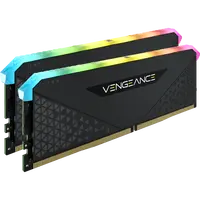
Looking to upgrade? Let's talk facts. The computer is crawling, Chrome tabs are crashing – it's time to add some power. Here at Topmarket, we've got you covered with fast nationwide delivery, up to 12 interest-free installments, and most importantly – official importer warranty. No need to fear 'parallel import' or products without backing. Because buying RAM online should be easy. Not a headache.
How to Choose RAM? (Without Making Beginner Mistakes)
So you've decided to buy RAM. Great. But hold on a second before you add to cart... what kind of stick do you even need? First off, the form factor. Laptop RAM (SO-DIMM) will never fit into a desktop motherboard (DIMM). Physically, they are different. Check carefully.
Memory capacity? 8GB is ancient. In 2026? Maybe for an office computer that only does Excel. For gamers or programmers, it's recommended to start with a 16GB RAM kit. But honestly, 32GB (usually two 16GB sticks in Dual Channel) is the new standard. Go for 64GB only if you're doing heavy 3D rendering or 4K video editing all day.
DDR4 vs. DDR5 – Which is Right for You?
Here's something many people miss. An old motherboard won't accept DDR5 RAM. If you have an existing system that just needs a boost – you probably need DDR4. A clock speed of 3200MHz or 3600MHz will serve you well.
But – and this is a big but. Building a new PC from scratch? Only DDR5. Frequencies from 5200MHz to 6000MHz. New technology costs a bit more, but where can you buy RAM in Israel without breaking the bank? With us. We have special online RAM prices that compete closely with overseas. Also pay attention to latency (timing). CL30 or CL36... a lower number means higher speed. Without getting too complicated.
Top Brands: Don't Buy Garbage
Some things you don't compromise on. Computer memory must be reliable. Corsair Vengeance, Kingston FURY, G.Skill Trident Z. Also Crucial or TeamGroup. These are the names you want. Also look for XMP or EXPO profiles in the specs, it will help you reach maximum speed with one click. Heatsinks? Essential for maintaining temperature. RGB lighting? Well, only if you like your case to light up the whole room at night.
Why Buy From Us?
Everyone compares RAM prices these days. Obviously. You're looking for cheap RAM but don't want to fall for scammers. As a RAM store in Israel that respects its customers, everything here is from an official importer. Many models come with a lifetime warranty. Peace of mind. The best RAM to buy from someone who has your back when the screen suddenly turns blue.
Quick Standard Comparison
| Standard | Common Frequency (Clock Speed) | Voltage | Suitable For Which Systems? |
|---|---|---|---|
| DDR4 | 3200MHz - 3600MHz | 1.2V - 1.35V | Upgrading existing systems, low budget |
| DDR5 | 5200MHz - 6000MHz+ | 1.1V - 1.25V | New gaming PCs in 2026, professional editing |
How Much Capacity Do You Really Need?
| Memory Capacity | Primary Use |
|---|---|
| 8GB | Basic browsing, Word, YouTube (not recommended today) |
| 16GB (2x8GB) | Light to medium gaming, smooth daily work |
| 32GB (2x16GB) | Heavy gaming, streaming, serious multitasking |
| 64GB and up | 4K/8K video editing, virtual machines, development |
Frequently Asked Questions Before Buying (FAQ)
How much does computer RAM cost?
Depends on what you're looking for. RAM prices start around 100 to 200 shekels for a basic 8GB DDR4 stick. But if you're going for an impressive kit of 32GB DDR5 from a killer brand with RGB? It can reach 600 shekels and up. Prices are dynamic, but it's usually more worthwhile to buy a dual kit.
How do I know which RAM is compatible with my computer?
Easiest way – download a small program called CPU-Z and check the Memory tab to see what's currently installed. You can also search for your motherboard model on Google and check the manufacturer's website to see what it supports (DDR4 or DDR5) and up to what frequency. Don't just buy based on looks.
What's the difference between RAM for desktops (DIMM) and laptops (SO-DIMM)?
Size. A laptop stick (SO-DIMM) is much shorter and smaller. A desktop stick (DIMM) is longer. You can't swap them; the connectors on the motherboard simply don't match. Pay attention to this when filtering.
Can I combine two different types or speeds of RAM?
Can you? Yes. Should you? Absolutely not. If you put a 3600MHz stick next to a 3200MHz stick, the system will lower the speed of the faster one to match the slower one. Sometimes it also causes blue screens. Buy a kit that works in Dual Channel right out of the box, and that's it.
How much RAM is needed for gaming in 2026?
We used to say 16GB was more than enough. Today, games have become monsters. 16GB is the bare minimum to avoid stuttering. If you ask me? 32GB is what you want to play smoothly while Discord and other things are running in the background.
Is there a warranty on RAM purchased online at TopMarket?
Of course. Everything here is from an official importer. Most RAM from major brands comes with a lifetime warranty on the product itself. So if a stick suddenly dies after two years – you know who to contact.

